Hi this is Team Merchant Navy Decoded !!!
Please fill the below form with your query and we will get back to you in next 12 hours.
Rest assured your data is safe with us !!!🙂
Ask Your Query| For Beginner | For Professional |
|---|---|
| GME | Engine Side |
| G.P. Rating | Deck Side |
| ETO | G.P. Rating |
| IMUCET & Sponsorship | Combo Offers |
| Free Course | MEO |
| Free Course |
| For Beginner | For Professional |
|---|---|
| GME | Engine Side |
| G.P. Rating | Deck Side |
| ETO | G.P. Rating |
| IMUCET & Sponsorship | Combo Offers |
| Free Course | MEO |
| Free Course |
If you are working in the Merchant Navy and face a problem related to wages, employment, recruitment, documents, training or any other maritime matter, you need a proper official channel to raise it. Earlier, DG Shipping had a grievance redressal mechanism, but seafarers did not get the same level of digital tracking that is now available through e-Navik.
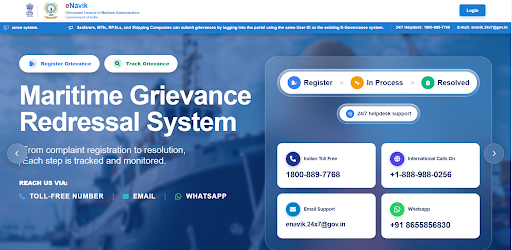
The e-Navik Portal is DG Shipping’s 24×7 Maritime Grievance Redressal System. It allows seafarers and other maritime stakeholders to register a grievance online and track its progress. This means you do not have to depend only on confirmation emails or repeated follow-ups to know what is happening with your complaint.
The e-Navik Portal is an online grievance redressal platform of the Directorate General of Maritime Administration/DG Shipping. It is designed for the registration, processing and tracking of maritime grievances. According to DGMA, grievances lodged through the mechanism receive a unique ticket ID, which helps with acknowledgement, tracking and monitoring.
For a seafarer, the purpose is simple: if you have a genuine problem connected with your maritime career or employment, you can raise it through an official digital system and follow the status of the case.
Under the earlier grievance process, a seafarer could submit a complaint and normally receive confirmation that it had been received, but tracking the case was not as clear or structured. The user could not easily see every stage of the grievance from one dashboard.
With e-Navik, grievance registration and tracking are brought into one digital system. The portal shows the grievance status and keeps the complaint connected to a unique ticket ID. For seafarers, this makes follow-up simpler because they can check whether the grievance is still pending, has been resolved or has been rejected.
A seafarer may need e-Navik in situations such as unpaid wages, unfair treatment, fraud by an agent, recruitment problems, documentation issues or employment-related disputes. DGMA also states that the grievance mechanism covers complaints against RPSL agencies, fraudulent documentation, abandonment, detention, certification matters, welfare concerns, death and missing-seafarer cases.
The portal is useful because the complaint is not just submitted and forgotten. It enters a structured system where its progress can be tracked.
Registered users can open the official e-Navik Portal and click Login. The current official login page says that existing DGMA e-Governance users—including seafarers, MTIs, RPSLs and shipping companies—can use the same user ID and password to sign in.
After login, the seafarer can access the grievance dashboard and use the Register Grievance option. The welcome page also provides a Track Grievance facility. Some unregistered users, including next of kin and students, have a separate grievance registration route available on the portal.
After logging in, click Register Grievance. Some basic information linked to the registered seafarer profile may already be available in the form. You then need to choose the correct grievance category and sub-category, enter the incident location, describe the problem, mention the outcome you expect and attach relevant supporting documents.
The basic process is:
After submission, keep the grievance or ticket details safely because they are useful for tracking the complaint.
The e-Navik grievance form provides different categories so that a complaint can be sent under the correct maritime subject. The exact options can depend on the issue and portal updates, but the categories shown in the grievance system include matters such as:
After choosing the main category, select the closest available sub-category. For example, a Seafarer Profile complaint may involve a profile or photo-related issue, while a BSID grievance may concern payment or processing. Choosing the correct category makes the complaint easier to understand and route.
The Incident Location field tells DG Shipping where the issue happened or which location is connected with it. After that, write the Detailed Description of the grievance. Keep it clear: explain what happened, when it happened, who was involved and what problem is still unresolved. If the issue is unpaid wages, for example, mention the unpaid period and the company or vessel involved instead of writing only that the company has not helped you.
You must also fill in the Expected Outcome—what resolution you want from DG Shipping. This may be correction of a document, action on a complaint, payment of pending wages or another relevant resolution. Upload supporting documents such as emails, payment records, contracts, screenshots, certificates or other evidence that directly supports the grievance.
After submitting the grievance, you can track its progress through the e-Navik system. The dashboard can show the number of grievances under statuses such as Pending, Resolved and Rejected, along with the total number of grievances raised.
Open the relevant grievance to check its current status and available updates. If the concerned authority asks for further information or supporting documents, provide them through the available grievance communication process. This tracking system is one of the main differences between e-Navik and the older grievance process.
The official e-Navik Portal also provides 24×7 support channels for grievance-related assistance:
These details are useful if you face difficulty accessing the portal or need help related to the grievance mechanism.
The e-Navik Portal gives seafarers a more organised way to file and track complaints with DG Shipping. If you face a genuine issue involving wages, recruitment, employment, documentation, certification or another maritime matter, you can use the portal to register the grievance with the correct details and supporting evidence.
The process is straightforward: login, select Register Grievance, choose the correct category, explain the problem, mention your expected outcome, upload supporting documents and submit it. After submission, continue checking the grievance status until the case is resolved.
e-Navik is DG Shipping’s 24×7 Maritime Grievance Redressal System for registering and tracking grievances related to seafarers and maritime stakeholders.
Existing DGMA e-Governance users can use the same user ID and password on the official e-Navik login page.
Yes. Wage disputes are among the grievances covered by the official e-Navik grievance redressal mechanism.
Use the e-Navik dashboard or Track Grievance option to check the status and updates of a submitted grievance.
The Indian toll-free e-Navik helpdesk number currently listed by DGMA is 1800-889-7768.
Disclaimer :- The opinions expressed in this article belong solely to the author and may not necessarily reflect those of Merchant Navy Decoded. We cannot guarantee the accuracy of the information provided and disclaim any responsibility for it. Data and visuals used are sourced from publicly available information and may not be authenticated by any regulatory body. Reviews and comments appearing on our blogs represent the opinions of individuals and do not necessarily reflect the views of Merchant Navy Decoded. We are not responsible for any loss or damage resulting from reliance on these reviews or comments.
Reproduction, copying, sharing, or use of the article or images in any form is strictly prohibited without prior permission from both the author and Merchant Navy Decoded.
Decoded Discount Alert! up to 50% OFF
Use Coupon Code Deep50